

In today’s digital era, learning how to play the guitar online has become more accessible than ever before. With a wealth of digital tools available, two standout platforms—Ultimate Guitar and Chordify has lead the market for learning songs on desktop and mobile devices. Both offer feature-packed apps for guitarists, but their core approaches to music education, song transcription, and user experience are vastly different. In this detailed comparison of Chordify vs Ultimate Guitar, we examine their features, song libraries, accuracy, pricing, pros, and cons to help you decide which platform best fits your playing style.
| Feature | Chordify | Ultimate Guitar |
|---|---|---|
| Core Focus | AI Chord Recognition & Visual Sync | Massive Tab Library & Community Chords |
| Song Library | Unlimited (via YouTube / Audio analysis) | 1.4M+ Cataloged Tabs & Transcriptions |
| Notation Type | Basic Chords (Guitar, Ukulele, Piano) | Chords, Tabs, Pro Interactive Scores, Bass, Drums |
| Best For | Rhythm players, quick jam-alongs | Lead guitarists, detailed riff breakdown |
Understanding Chordify vs Ultimate Guitar
Both platforms are designed to assist musicians in their learning journey, but they cater to very different learning styles. Chordify focuses primarily on automated chord recognition, converting audio playback into playable chord progressions in real time using artificial intelligence. Conversely, Ultimate Guitar is built around a vast, community-driven database featuring full-song tablature, lead solos, chord sheets, and interactive practice tools.
Chordify: An Overview
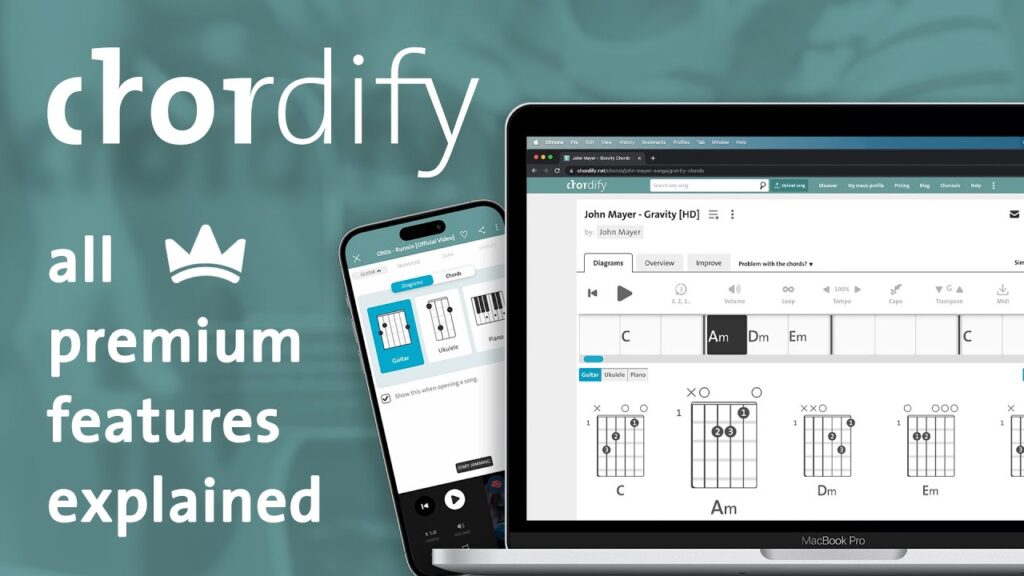
Founded in 2013, Chordify is an innovative music e-learning platform that uses an automated chord recognition algorithm to analyze audio files or online streaming links. It generates instant chord diagrams for guitar, piano, and ukulele. Its streamlined user interface and real-time audio playback synchronization make it an exceptional tool for quick jam sessions and rhythm playing.
Ultimate Guitar: An Overview
Established in 1998, Ultimate Guitar (UG) is one of the longest-standing online resources for guitarists worldwide. It boasts an extensive catalog containing millions of user-submitted guitar tabs, chord sheets, and guitar bass arrangements. Alongside its global community of contributors, the Ultimate Guitar Pro tier offers interactive tablature, official studio tab releases, tuners, auto-scrolling, and backing tracks.
Key Features of Chordify
Automatic Chord Recognition and Audio Uploads
Chordify’s defining feature is its AI-driven detection engine. You can enter any YouTube link or upload custom MP3, WAV, or MIDI files, and the software will instantly construct an interactive chord grid synced directly with the audio track.
Visual Beat Alignment and User Interface
Chordify utilizes an animated cursor that jumps across a measure grid in time with the song’s tempo, helping rhythm guitarists stay on beat. Its interface is minimal, modern, and cross-compatible across desktop web browsers, iOS, and Android mobile devices.
Key Features of Ultimate Guitar
Ultimate Guitar provides deeper musical precision for players looking to study individual notes, riffs, and intricate lead solos rather than relying solely on rhythm chord charts.
Vast Tablature Library & Community Variations
Ultimate Guitar holds a dominant position in song catalog size. Its active global community frequently uploads multiple arrangements of popular tracks, accompanied by user star-ratings so you can identify the most accurate version instantly. It also contains detailed breakdowns of guitar riffs and tabs for lead guitarists.
Interactive Pro Features & Built-In Tools
With an Ultimate Guitar Pro subscription, players gain access to interactive tabs with playback speed control, instrument isolating capabilities, auto-scrolling text, backing tracks, and integrated guitar tools such as chromatic tuners and metronomes.
Comparing Usability, Accuracy, and Song Library
Usability: Clean Simplicity vs Feature-Rich Depth
If you prefer a clean workspace without clutter, Chordify provides a streamlined layout focused purely on playing along to an audio track. Ultimate Guitar offers significantly more feature depth, though its free web platform and mobile apps display a higher volume of advertisements and promotional pop-ups during navigation.
Song Selection & Precision
While Ultimate Guitar features over a million transcribed tracks, it relies heavily on human community submissions, leading to occasional quality variance among free tabs. Chordify technically offers an infinite song catalog because it can process any public streaming link or uploaded audio file, although its AI chord recognition algorithm may occasionally misinterpret complex extended jazz chords or non-standard guitar tunings.
Pricing and Subscription Options
Both services operate on a freemium pricing model, offering functional free access alongside premium subscription upgrades:
- Chordify Premium: ~$9.99/month or $49.99/year. Unlocks chord transposition tools, playback tempo control, custom audio file uploads, PDF chord sheet exports, and ad-free browsing.
- Ultimate Guitar Pro: ~$12.99/month or $39.99/year (frequent promotional discounts available). Unlocks interactive Pro tab scores, official studio transcriptions, chord transposition, auto-scroll, backing tracks, and built-in practice tools.
Pros and Cons Breakdown
Chordify Pros & Cons
Pros:
- Instant AI chord detection for virtually any song available on YouTube.
- Extremely intuitive, visual beat-synced animated measure interface.
- Ability to upload custom MP3, WAV, or MIDI files for automated chord analysis.
- Seamless switching between guitar, ukulele, and piano chord diagrams.
Cons:
- Does not provide lead guitar tablature, solos, or fingerpicking notation.
- Automated AI recognition can struggle with complex slash chords or altered tunings.
- Free plan restricts custom audio file uploads and key transposition tools.
Ultimate Guitar Pros & Cons
Pros:
- The world’s largest repository of text tabs, chord charts, and official Pro scores.
- Community rating system highlights the most accurate transcriptions.
- Robust interactive practice tools including transposition, tempo manipulation, auto-scroll, and backing tracks.
- Includes complete multi-instrument arrangements, including bass guitar lines and drum tracks.
Cons:
- The free website and mobile app feature frequent ad prompts.
- User-contributed free tabs vary in quality and transcription accuracy.
- Feature-dense interface can feel overwhelming for beginner guitarists.
Frequently Asked Questions
Which platform is better for beginner guitarists?
Chordify is ideal for absolute beginners who want to strum along to rhythm tracks immediately without needing to read guitar tabs. Ultimate Guitar is better for beginners looking to learn specific riffs, fingerpicking techniques, and standard tablature notation.
Can I upload my own music files to generate chord charts?
Yes, Chordify Premium allows users to upload local MP3, WAV, or MIDI files to automatically extract chord progressions. Ultimate Guitar does not process local audio uploads, but it enables users to manually submit text-based tabs and chord charts to its database.
Are mobile applications included with subscription plans?
Yes, both services offer mobile apps for iOS and Android devices that sync cross-platform with your web browser subscription account.
Final Verdict: Which Guitar App Should You Choose?
Choose Chordify if you want an accessible, visual way to strum along with songs in real time, jam to obscure recordings, or quickly convert YouTube audio into simple chord diagrams.
Choose Ultimate Guitar if you want to learn songs note-for-note, master lead solos, analyze multi-instrument arrangements, or build an expansive library of printable sheet music and guitar tabs.